ABSTRACT
In this demonstration, we present the Quick Red Fox (QRF) system, a system design to assist researchers in conducting Data-Driven Classroom Interviews (DDCIs). DDCIs enables researchers to collect rich qualitative interview data at key moments of the students’ interaction with a digital learning environment. Using the QRF system, researchers can use EDM methods to analyze logs of student interaction data, identify interview triggers and provide classroom interviewers with real-time interview requests on a handheld Android app. We describe the main components of the QRF system (the QRF android app, the QRF server and the QRF dashboard) and demonstrate the usage of QRF in the context of WHIMC, a Minecraft-based learning system in which students learn about astronomy.
Keywords
INTRODUCTION
The analysis of student interaction log data using EDM approaches has been successfully used to achieve a range of educational goals ranging from the use of Discovery with Models to improve our understanding of student learning processes (as described in [1]), to generate data-driven student support (such as data-driven feedback, recommendations or interventions; [2], [3]), to design student and teacher facing learning dashboards ([4], [5]), and to inform the design of learning tasks and learning environments ([6], [7], [8]). In this demonstration, we present the Quick Red Fox (QRF) system, a system that leverages EDM methodologies to support the collection of rich in-the-moment qualitative data. Using this system, researchers can leverage data-driven analyses of students’ interaction log data to collect Data-Driven Classroom Interviews (DDCI) at key moments in the students’ usage of digital learning environments.
Data-driven Classroom interviews (DDCI)
The purpose of QRF is to provide researchers with immediate, and contextualized students reactions to learning systems. Unlike other methods that attempt to capture in situ data, such as Think Aloud methods [9], QRF allows us to target specific learning events that are detectable in a learning software so that researchers can observe and interview students while that event is still fresh in their minds. In that way, we can ensure that interviewers are able to provide students with questions about those experiences that help us to address underlying research questions, and we can do so without asking the student to carry the metacognitive load of figuring out what would be relevant to the research question, which is sometimes a criticism of methods like Think Alouds [10].
DDCIs are often very short (3-7 minutes). Questions may vary depending upon the underlying research question, and interviewers are encouraged to develop a range of question strategies before entering the field, as they are likely to have many DDCIs with each student over the course of a fieldwork experience. For example, if students are using the system for an hour a day, it might not be unusual for a single student to be interviewed more than once, and if the fieldwork efforts extend over a week, the same interviewer may talk to one student a dozen times.
Interviewers are trained to take a friendly but non-authoritative approach where they express interest about the students’ experience [11]. This allows them to pivot to specific questions about the students’ immediate experience without becoming bogged down with questions about how the learning system works or with requests from the student to have the interviewer explain the learning material. Instead, if the student is struggling, the interviewer might ask what strategies they have already tried, which strategies they might still need to try, and more generally how the student usually goes about dealing with learning obstacles.
This approach allows the interviewers to establish student trust, so that they are willing to make suggestions about what might improve their learning or engagement. As such, the approach lends itself well to investigating research questions about both the difficulties that students might be having at any given moment and about any assets students bring to the learning context [12].
The Quick red fox (QRF) system
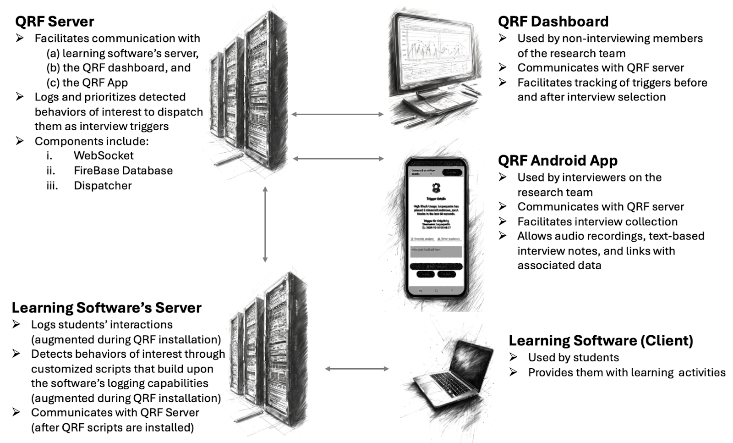
The QRF system provides multiple inter-related components (the QRF android app, the QRF server and the QRF dashboard) that can be used together to facilitate the implementation of DDCIs using an existing digital learning system (see Figure 1). QRF is made available as an open-source system and its user manual provides instructions about how to access the QRF source code and the steps required to setup a QRF server (see “Appendix 2: Installing the QRF server” of the user manual [11] for detailed instructions).
The QRF Android App
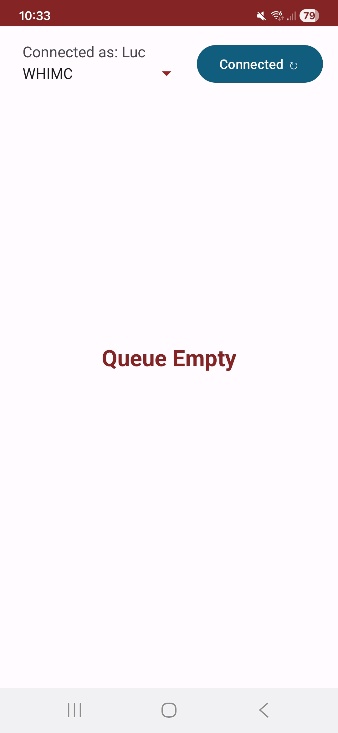
The QRF Android App is the tool used by interviewers to conduct DDCIs. Interviewers are first asked to login to the app with their username. Once logged in, the app waits for the QRF server to send it an interview trigger (see left of Figure 2). The right side of Figure 2 shows the app’s interface after it receives an interview trigger. It provides the interviewer with information about the trigger that was just received, including the trigger’s description, which student triggered the interview prompt and the time at which the trigger was detected.

Once an interview prompt is provided to the interviewer, they can review the prompt to decide whether they would prefer to skip this interview, for example when the student’s attention is already occupied and they should not be disturbed. If the interviewer decides to proceed with the interview, it can be recorded directly through the app by pushing the “Record Feedback” button (we recommend using an external, directional microphone that can help with reducing background noise). Audio recordings are stored locally on the phone. In addition, the QRF app can be configured to automatically send the recordings to a data server. Interviewers can also add text notes to provide additional contextual information about the interview. They can “override” the interviewed student if they have observed a salient event from another student that they wish to interview as soon as possible. Through our past interviews, we have also observed that neighboring students sometimes join ongoing interviews. In such a case, the app allows the interviewer to make explicit note of which “Other student/s” joined the interview. Finally, once an interview is completed, the interviewer pushes the “Next” button. The app then sends information about the interview to the QRF server and goes back to waiting for the next available interview prompt.
The QRF server
The central component of the QRF server is the dispatcher program which is responsible for receiving interview triggers from the learning system, keeping track of active triggers for each student and dispatching triggers to classroom interviewers.
Communication between the learning environment, the dispatcher program and the QRF app uses the websocket communication protocol. When the learning environment detects a situation that was identified as an interview trigger, it sends information about this trigger (its description, what students triggered it, and its priority) to the dispatcher. The dispatcher receives the triggers and organizes them in a queue, based on their priority (a numerical value provided by the learning environment along with the trigger). Triggers are maintained in the queue for a predetermined amount of time (can be adjusted by the researchers) before they timeout and are removed from the queue. This mechanism prevents interviewers from being asked to interview students for a trigger that happened too long ago and is no longer relevant.
When the QRF app notifies the dispatcher program that an interviewer is available, the dispatcher selects the trigger with the highest priority and sends it to the QRF app. In addition to the numerical priority of the triggers, the dispatcher implements mechanisms to avoid frequent repeated interviews of the same student. The dispatcher can be configured to enforce a minimum waiting period between the end of an interview and the next interview request for the same student. This mechanism is designed to minimize situations where a student might experience interview fatigue and maximize the chances that all students are interviewed during data collection.
Throughout this process, the dispatcher program logs all the received triggers to a Firebase database to keep records of which trigger was received, for which student and at what times. It also logs information about which interviewer (if any) received the trigger on their QRF app, and whether the interviewer decided to skip the interview request. If an interview is conducted, the dispatcher also logs metadata about the interview (e.g., when did the interview start, how long did it last, did the interviewer add any text note to the interview, etc.)
The QRF dashboard
The QRF dashboard is a web browser-based interface that allows the research team to monitor interview triggers and interviews during data collection. The dashboard can be configured to interface with both the Firebase database (storing information about the detected interview triggers and the resulting interviews) and the data server used to store audio recordings (if a data server is used).
The dashboard displays a table with information about each trigger that has been sent to the dispatcher program. It is automatically updated at regular intervals to display the most recent triggers. During data collection, the dashboard is typically used by the research team as a way to verify that the QRF system is functioning as expected (e.g., triggers are being received by the dispatcher and logged in the database), and to monitor which triggers are being received by the dispatcher and which ones are sent to the interviewers. Such real-time monitoring of the received trigger can be useful to identify whether any adjustments of trigger priorities might be warranted during data collection to increase the likelihood that a rare, but important trigger will be forwarded to interviewers. If audio recordings are being uploaded to a data server, the dashboard can also be configured to access the audio recordings, allowing the research team to playback interviews from the dashboard.
DDCI implmentation in WHIMC
In this demo, we will show an example of how the QRF system has been integrated with WHIMC (What-if Hypothetical Implementations in Minecraft) [13], a Minecraft-based learning system in which students learn about astronomy while exploring virtual recreation of hypothetical Earths (e.g., what would Earth be like if there were no moon). The WHIMC system includes two main types of learning activities: exploration of what-if worlds and building a space habitat on Mars.


During what-if exploration worlds, students are asked to explore a virtual recreation of a what-if Earth and to investigate how this Earth differs from ours. During their exploration, students can, at any moment, use scientific measurement tools (e.g. Figure 3) to collect data about different aspects of the what-if world (e.g., its gravity, wind speed, temperature, etc.). They can also write down observations (e.g. Figure 4) that are displayed in the world, at the coordinates where the observation was made. Throughout their exploration students may encounter various non-player characters (NPCs) and points of interest (e.g., a greenhouse, a windmill, etc.) that provides them with clues about the differences between the virtual world they are exploring and our Earth, and about which measurement tool might provide them with relevant information about these differences. Students typically explore each exploration world for a short period of time (around 20 minutes).
During the Mars habitat building activity, students interact with the recreation of a part of Mars. They work in small groups (2-3 students) with the goal of building structures that could be used as a habitat on Mars. Students are given instructions about characteristics of a habitat that would make it appropriate for life on Mars (e.g., does the habitat have a source of food and water, does it have a source of electric power, etc.) Students typically work on their Mars habitat for 3-4 hours across 2 days.
As part of this demo, participants will be able to interact with the WHIMC learning environment. They will be shown how their actions in WHIMC (e.g., using a scientific tool near an NPC or using a specific type of block during Mars habitat building) activate predetermined interview triggers requests. They will be able to interact with the QRF app to record short interviews and see how logs and audio recordings of their interviews are being reported on the QRF dashboard. The demo will also show an example of a simple Python script illustrating how triggers are sent to the QRF server from the learning environment.
ACKNOWLEDGMENTS
This study was supported by the National Science Foundation (NSF; DRL-2301172). Any conclusions expressed in this material do not necessarily reflect the views of the NSF.
REFERENCES
- Baker. R.S., and Yacef, K. 2009. The state of educational data mining in 2009: A review and future visions. Journal of Educational Data Mining, 1, 1, 3-17. DOI=https://doi.org/10.5281/zenodo.3554657
- Jia, Q., Young, M., Xiao, Y., Cui, J., Liu, C., Rashid, P., and Gehringer, E. 2022. Automated feedback generation for student project reports: A data-driven approach. Journal of Educational Data Mining, 14, 3, 132-161. DOI=https://doi.org/10.5281/zenodo.7304954
- Paaßen, B., Hammer, B., Price, T. W., Barnes, T., Gross, S., and Pinkwart, N. 2017. The continuous hint factory - Providing hints in vast and sparsely populated edit distance spaces. Journal of Educational Data Mining, 10, 1, 1-35. DOI=https://doi.org/10.5281/zenodo.3554697
- Borchers, C., Peng, C., Lyu, Q., Carvalho, P. F., Koedinger, K. R., and Aleven, V. 2025. Student perceptions of adaptive goal setting recommendations: A design prototyping study. In International Conference on Artificial Intelligence in Education, Cham: Springer Nature Switzerland, Palermo, Italy, 244-251. DOI=https://doi.org/10.1007/978-3-031-98462-4_31
- De Menezes, M. F., Netto, J. F. D. M., Lopes, A. M. M., Silva, R. C., and Menezes, R. A. 2023. The proposal of a dashboard for analysis and visualization of educational data of intelligent tutoring systems. In 2023 IEEE Frontiers in Education Conference (FIE), IEEE, College Station, TX, USA, 1-8. DOI=https://doi.org/10.1109/FIE58773.2023.10343000
- Pelánek, R., Effenberger, T., and Kukučka, A. 2022. Towards design-loop adaptivity: Identifying items for revision. Journal of Educational Data Mining, 14, 3, 1-25. DOI=https://doi.org/10.5281/zenodo.7357331
- Kerr, D. 2015. Using data mining results to improve educational video game design. Journal of Educational Data Mining, 7, 3, 1-17. DOI=https://doi.org/10.5281/zenodo.3554723
- Liu, R., and Koedinger, K.R., 2017. Closing the loop: Automated data-driven cognitive model discoveries lead to improved instruction and learning gains. Journal of Educational Data Mining, 9, 1, 25-41. DOI=https://doi.org/10.5281/zenodo.3554625
- Ericsson, K.A., and Simon, H.A. 1980. Verbal reports as data. Psychological review, 87, 3, 215-251. DOI= https://psycnet.apa.org/doi/10.1037/0033-295X.87.3.215
- Boren, T., and Ramey, J. 2000. Thinking aloud: Reconciling theory and practice. IEEE Transactions on Professional Communication, 43, 3, 261-278. DOI= https://doi.org/10.1109/47.867942
- Ocumpaugh, J., Paquette, L., Baker, R.S., Barany, A., Ginger, J., Casano, N., Zambrano, A., Liu, X., Wei, Z., Zhou, Y., Liu, S., Hutt, S., Andres, A., Nasiar, N., Giordano, C., van Velsen, and M., Mogessie, M. 2025. The Quick Red Fox gets the best Data Driven Classroom Interviews: A manual for an interview app and its associated methodology. https://arxiv.org/pdf/2511.13466
- Ocumpaugh, J., Roscoe, R.D., Baker, R.S., Hutt, S., and Aguilar, S.J. 2024. Toward asset-based instruction and assessment in artificial intelligence in education. International Journal of Artificial Intelligence in Education, 34, 1559-1598. DOI= https://doi.org/10.1007/s40593-023-00382-x
- Lane, HC., Gadbury, M., Ginger, J., Yi, S., Comins, N., Henhapl, J., and Rivera-Rogers, A. 2022. Triggering STEM interest with Minecraft in a hybrid summer camp. Technology, Min, and Behavior, 3, 4, 580-597. DOI= https://doi.org/10.1037/tmb0000077
© 2026 Copyright is held by the author(s). This work is distributed under the Creative Commons Attribution-NonCommercial-NoDerivatives 4.0 International (CC BY-NC-ND 4.0) license.